Notes
By Muffaddal Masalawala
Normal Scenario
- Website http://www.example.com is configured to go through a reverse proxy.
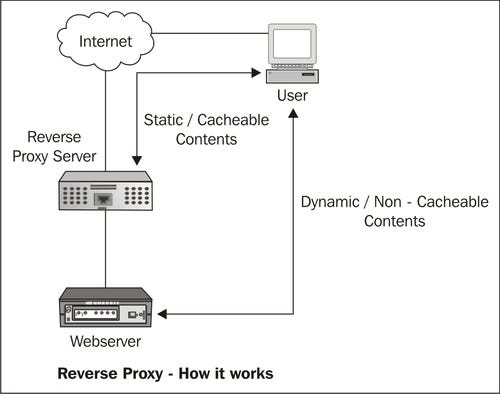
- A dynamic page (after authentication) that is stored on the server and returns personal content of users, such as http://www.example.com/home.php, will have to create it dynamically per user, since the data is different for each user. This kind of data, or at least its personalized parts, isn't cached.
- What's more reasonable and common to cache are static, public files: style sheets (css), scripts (js), text files (txt), images (png, bmp, gif), etc as these files usually don't contain any sensitive information.
note
- All static files that are meant to be public, are cached disregarding their HTTP caching headers.
- Various static file extensions could be used to cache pages: aif, aiff, au, avi, bin, bmp, cab, carb, cct, cdf, class, css, doc, dcr, dtd, gcf, gff, gif, grv, hdml, hqx, ico, ini, jpeg, jpg, js, mov, mp3, nc, pct, ppc, pws, swa, swf, txt, vbs, w32, wav, wbmp, wml, wmlc, wmls, wmlsc, xsd, zip
Attack Scenario
- A GET request to the URL http://www.example.com/home.php/non-existent.css is made
- Depending on its technology and configuration (the URL structure might need to be built slightly different for different servers), the server returns the content of http://www.example.com/home.php.
- The URL remains http://www.example.com/home.php/non-existent.css
- The HTTP headers will be the same as for accessing http://www.example.com/home.php directly: same caching headers and same content type (text/html, in this case)
Detailed
- Browser requests http://www.example.com/home.php/non-existent.css.
- Server returns the content of http://www.example.com/home.php, most probably with HTTP caching headers that instruct to not cache this page.
- The response goes through the proxy.
- The proxy identifies that the file has a css extension.
- Under the cache directory, the proxy creates a directory named home.php, and caches the imposter "CSS" file (non-existent.css) inside.
- When next time a user requests non-existent.css file, reverse proxy will not send that request to the web server, instead, it will serve the user with the data that it had stored in its cache. Thus, the request for static data is not reaching the web server again.
Exploit Scenario
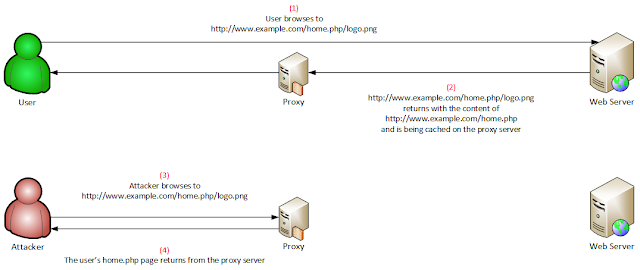
- An attacker who lures a logged-on user to access http://www.example.com/home.php/logo.png will cause this page – containing the user's personal content – to be cached and thus publicly-accessible.
- It could get even worse, if the body of the response contains (for some reason) the session identifier, security answers or CSRF tokens.
- All the attacker has to do now is to access this page on his own and expose this data.
Impact
Video Reference: https://vimeo.com/249130093
Conditions to check Web Cache Deception Attack
- The victim must be authenticated while accessing the malicious URL
- Web cache functionality is set for the web application to cache files by their extensions, disregarding any caching header.
- When accessing a page like http://www.example.com/home.php/non-existent.css, the web server will return the content of "home.php" for that URL.
Mitigation
- Configure the cache mechanism to cache files only if their HTTP caching headers allow. That will solve the root cause of this issue.
- Store all static files in a designated directory and cache only that directory.
- If the cache component provides the option, configure it to cache files by their content type.
- Configure the web server so that for pages such as http://www.example.com/home.php/non-existent.css, the web server doesn’t return the content of "home.php" with this URL. Instead, for example, the server should respond with a 404 or 302 response.